A spreadsheet is a computer application or program that enables the user to tabulate and collate data. This data can then be used to make calculations, show graphical representations or analysis.
A spreadsheet comprises of a grid of ‘cells’ arranged in rows and columns and information can be inserted into each cell.
Each cell can contain text, numbers and formulas.
A formula is a calculation based from the contents of cells or a total of a combination of cells. The total in that formula can change if the content of the combination cells used is also amended.
Spreadsheets can be useful for home budgeting or accounting and they make it easy to display information.
Spreadsheets can consist of a number of different worksheets that can include different data as well as enabling cells on one worksheet to be used and referenced on other different worksheets.
Information can also be sorted and filtered by a spreadsheet.
The Microsoft Office spreadsheet is called Excel but there are open office spreadsheets available, including internet based web apps such as Google spreadsheets.
Spreadsheets have a number of tools included to support many different types of calculations and can include graphical presentations such as graphs, pie charts etc.
Saturday, October 31, 2015
Tuesday, September 29, 2015
HOW TO CONNECT TO THE INTERNET
When choosing a supplier, you need to take into account the various packages on offer. These will differ in price depending on the maximum speed they offer and the monthly usage allowance.

Some ISPs, particularly the mobile suppliers, impose a monthly download limit or usage allowance. This is measured in gigabytes (Gb). To put this in context, 1Gb will allow you to visit approximately 10,500 webpages or download around 205 songs.
Step 2: Having chosen an ISP and signed the contract

Thursday, September 17, 2015
HOW TO CHANGE TEST SIZE AND FONT
Step 1: Open an existing Word document or start a new document and type your text.
Step 2: If you’d like to change a portion of the text to a different font, it will need to be selected or highlighted first. When the mouse pointer is moved over a text area, it will change from an arrow to a ‘text select’ or ‘I-beam’ icon.

Step 3: Select your text so that it’s highlighted.
Step 4: To change the font style, click the arrow next to the font style in the ribbon at the top of your document.

Step 5: Choose your font style from the drop-down list given.
Step 2: If you’d like to change a portion of the text to a different font, it will need to be selected or highlighted first. When the mouse pointer is moved over a text area, it will change from an arrow to a ‘text select’ or ‘I-beam’ icon.

Step 3: Select your text so that it’s highlighted.
Step 4: To change the font style, click the arrow next to the font style in the ribbon at the top of your document.

Step 5: Choose your font style from the drop-down list given.
HOW TO PRINT ON MICROSOFT WORD
Step 1: Open an existing Word document or start a new document and type your text.

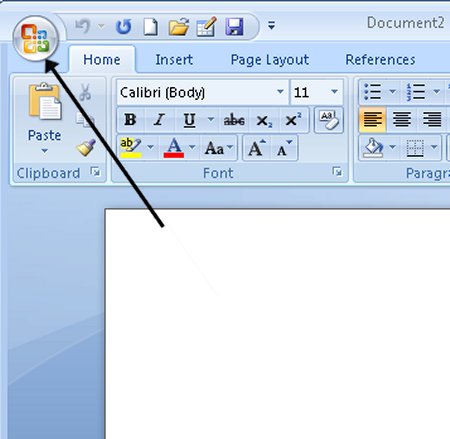
Step 2: Once you’ve completed your document and are ready to print, click File in the top left-hand corner of your document.

Alternatively, some versions of Word may have an Office button instead of a ‘File’ button – it’s a round Office icon in the top left-hand corner of the screen. Click on this if you have one.
Step 3: Move down and click Print in the menu. This will bring up the ‘Print’ dialogue box.

Step 2: Once you’ve completed your document and are ready to print, click File in the top left-hand corner of your document.

Alternatively, some versions of Word may have an Office button instead of a ‘File’ button – it’s a round Office icon in the top left-hand corner of the screen. Click on this if you have one.
Step 3: Move down and click Print in the menu. This will bring up the ‘Print’ dialogue box.
Wednesday, July 8, 2015
NEW UPCOMING ARTIST #SAHABERRY#
NEVER TRY TO MISS THIS ONE, GRAB YOUR NOW!!!!!!!!!
Download His latest hits on: Reverbnation/Sahaberry
and on www.bangtunes.com

For Sponsorship Contact Saha Berry On :
Tel: 08184713221
NEVER TRY TO MISS THIS ONE, GRAB YOUR NOW!!!!!!!!!
Download His latest hits on: Reverbnation/Sahaberry
and on www.bangtunes.com

For Sponsorship Contact Saha Berry On :
Tel: 08184713221
Email:Saha4yall@gmail.com
Facebook:SahaberryNEVER TRY TO MISS THIS ONE, GRAB YOUR NOW!!!!!!!!!
Tuesday, June 30, 2015

Wednesday, June 24, 2015
HOW TO SELECT A TEXT USING MICROSOFT WORD
Step 1: If you are not already in a Word document, you will need to open it. From the desktop or from your ‘Start’ menu, open Microsoft Word.
Step 2: Click either File or the Office button in the top left. Select Open and browse to the document you wish to open. Double-click on the file name to open.
Step 3: The mouse can be used to select text. When the mouse pointer is moved over a text area, the pointer will change from an arrow to a ‘text select’ or ‘I-beam’ icon.
 Step 4
Step 2: Click either File or the Office button in the top left. Select Open and browse to the document you wish to open. Double-click on the file name to open.
Step 3: The mouse can be used to select text. When the mouse pointer is moved over a text area, the pointer will change from an arrow to a ‘text select’ or ‘I-beam’ icon.

Thursday, June 18, 2015
HOW TO BE PERFECT IN USING MICROSOFT WORD
MEANING/DEFINITION
Microsoft Word is a word-processing application that can be part of the Microsoft Office suite or a stand-alone program installed on to your computer.
The program can be used to write letters and different types of documents that can include graphics and pictures. This guide explains how to open Microsoft Word and start a new document.
1 HOW TO START A DOCUMENT
Follow these step-by-step instructions to start a document in Microsoft Word
Step 1: From the desktop or from your ‘Start’ menu, open Microsoft Word.
 Step 2: Microsoft Word will open up automatically into a new document ready for you to start typing.
 Step 3: If Microsoft Word is already opened but you wish to start a new document, click File at the top left-hand corner of your document.
Microsoft Word is a word-processing application that can be part of the Microsoft Office suite or a stand-alone program installed on to your computer.
The program can be used to write letters and different types of documents that can include graphics and pictures. This guide explains how to open Microsoft Word and start a new document.
1 HOW TO START A DOCUMENT
Follow these step-by-step instructions to start a document in Microsoft Word
Step 1: From the desktop or from your ‘Start’ menu, open Microsoft Word.


Friday, June 12, 2015
HOW TO MAKE USE OF A COMPUTER MOUSE
Step 1: Pick up your mouse and have a look at it.
 At the front (which points away from you), there are two buttons – left and right. You press or, more correctly, ‘click’ these to make things happen.
Most mice also have a wheel in between the buttons that you roll to move up and down the screen – technically called ‘scrolling’.
Step 2: Learn to hold your mouse comfortably. It’s normally held between your thumb and little finger like this:

Most mice also have a wheel in between the buttons that you roll to move up and down the screen – technically called ‘scrolling’.
Step 2: Learn to hold your mouse comfortably. It’s normally held between your thumb and little finger like this:
Wednesday, June 3, 2015
HOW TO MAKE USE OF A COMPUTER KEYBOARD
Follow these step-by-step instructions to help you get to know what your keyboard can do:
STEP 1: Have a good look at your keyboard. The most important keys are labelled on the diagram below:
 Some keyboards, especially those on laptops, will have a slightly different layout. For example, yours might not have a number pad or the delete key may be in a different place. But virtually all keyboards will have these important keys somewhere.
STEP 2: The main keys are the letter keys. When you type just using these, you get lower-case print. However, if you hold down a ‘shift key’ (there are two to choose from) at the same time as you type, you’ll get UPPER-CASE letters.
Try typing your name, including capitals (UPPER-CASE) and spaces. The ‘space bar’ (which you press briefly to make a space) is the wide key at the bottom of the keyboard.
STEP 3: If you make a mistake in your typing, there’s always a remedy.
STEP 1: Have a good look at your keyboard. The most important keys are labelled on the diagram below:

STEP 2: The main keys are the letter keys. When you type just using these, you get lower-case print. However, if you hold down a ‘shift key’ (there are two to choose from) at the same time as you type, you’ll get UPPER-CASE letters.
Try typing your name, including capitals (UPPER-CASE) and spaces. The ‘space bar’ (which you press briefly to make a space) is the wide key at the bottom of the keyboard.
STEP 3: If you make a mistake in your typing, there’s always a remedy.
EASIEST WAY TO TURN ON A COMPUTER
STEP 1: Find the ‘on’ button. It probably looks like this (but might be square or oblong!)

 STEP 2: Separate Power Button for the MonitorYou may also need to switch on the monitor in order to see what the computer is displaying. A similar power button will usually be found in the lower right hand corner of the monitor screen.
STEP 3: Push the button.
On some computers, the button lights up when the computer is on. On laptops, there’s often a light on the front that comes on. You may have to keep pushing for a couple of seconds to make this happen, but don’t worry – you’ll soon get to know how your computer works.
If nothing happens, there are a few things you can check easily:


STEP 3: Push the button.
On some computers, the button lights up when the computer is on. On laptops, there’s often a light on the front that comes on. You may have to keep pushing for a couple of seconds to make this happen, but don’t worry – you’ll soon get to know how your computer works.
If nothing happens, there are a few things you can check easily:
Monday, March 2, 2015
YOU NEED TO KNOW WHAT A MOB IN THE NORTH DID TO A WOMAN WHO AVOIDED SECURITY CHECKS

An angry mob set ablaze a woman in Bauchi State for refusing to submit herself for security check.
According to the Daily trust the woman was torched in Bauchi’s Muda Lawal Market and the incident was confirmed by Police Public Relations Officer (PPRO) DSP Haruna Mohammed.
He said “information at our disposal revealed that a yet to be identified Lady, who allegedly refused to allow herself to be screened at the entrance of Muda Lawal Market Bauchi was attacked by irate mob who took law into their hands and set her ablaze. As a result, she died on the spot before rescue could come”.
Mohammed said
Native Doctor Dupes 70-Year Old Woman

A 48-year old native doctor has been arrested and charged before Ejigbo Magistrate’s court for allegedly defrauding a 70-year old jilted woman.
The woman, Grace Dinah, had contacted the native doctor to prepare her love potion that will enable her win back her husband after years of separation in Lagos State. The Osun State-born Akin Babalola allegedly collected N500,000 from Grace under false presence of preparing the love potion for her.
Instead of Babalola keeping his own part of the bargain, he allegedly duped the septuagenarian, claiming he could not prepare such medicine which might cause the death of her estranged husband.
Though Dinah denied that she asked Babalola to prepare love potion for her, saying she was merely duped, a police source said there was suspicion about a failed transaction between them.
I Can Die For PDP – Actress, Toyin Aimakhu Declare’s

It is no longer news that some of our celebrities are now identifying with one political party or the other but when it gets to the point that one of them make a proclamation that he/she can die for the party, then it might mean something else.
Although many people are of the opinion that politics should not be mixed with entertainment, recent developments have shown otherwise as entertainers are taking part in partisan politics. Recall that just recently, Singer Olamide released a campaign song for Buhari and Osinbajo.
Well, it is looking like it is now becoming a trend now as celebrities were all out for President Jonathan’s #MeetThePresident event which took place at Eko Hotels And Suites yesterday evening.
The event which was directed at making the youths meet with the president while a few ‘lucky ones get the chance to ask the president any question that has been bothering them concerning the state of the nation and many more. It was a star-studded event as stars like Timi Dakolo, Sean Tizzle, Orezi, Toyin Aimakhu, Oritsefemi, Mo’Cheddah, Omoni Oboli and many more graced the event.
However, at about 19:58, Nollywood actress Toyin Aimakhu got on stage and while campaigning for GEJ, she said “Mo le ku fu PDP,” which means ‘I can die for PDP’ in proper English language. Well, this declaration got some people surprised due to its extremity. A twitter user commenting on the proclamation of the actress last night tweeted,
Sokoto passengers hijacked 4 of our aircraft yesterday - Arik pilot writes in
 I just got an email from an Arik Air pilot who wants to remain
anonymous. Below is his side of the story about the incident that
happened at Abuja airport yesterday. His version below...
I just got an email from an Arik Air pilot who wants to remain
anonymous. Below is his side of the story about the incident that
happened at Abuja airport yesterday. His version below...Yesterday in Abuja, arik air was to operate a scheduled flight from Abuja to Sokoto at 8am. But the flight was canceled. Passengers got angry and anxious to know when they'll leave Abuja.
Then a bombardier Q400 aircraft was provided to fly them to Sokoto by 1pm. As they boarded, the pilot announced the plane had a snag so he disembarked the Sokoto passengers. Angry passengers got haywire on the ramp where aircraft were parked and hijacked 3 Arik aircraft from taking off. I was to fly to Benin from Abuja 3pm flight. Angry Passengers sat on the foot of the Aircraft blocking Benin passenger from boarding
'Though I have a babymama, I am still single & searching' - Flavour

In an interview with City People magazine this week, Flavour said despite the fact that he has a babymama, Sandra Okagbue, who he welcomed a daughter with in September 2014, he is still a single man and searching for love. He said there's no woman in his life at the moment
"Yes though I have a baby mama, I am still single and searching. Not that I wouldn't want to get married one day, I will definitely get married but I don't have the time to settle down for marriage now. I am all over the place pursuing my career. I will want to give my family attention and the best when I finally decide to settle down as my parents gave me. My family raised me up by monitoring my activities so I will like to do same for my family. But that is not my priority now because I need more time to plan for that and I need to pursue my career first" he told City People.
Pics: Actress Mercy Johnson And Her Cute Son Step Out In Style


Too cute. Mercy Johnson Okojie pictured with her son suited up as they headed out to a movie premiere in London over the weekend.
Happy 73rd birthday to Pastor Enoch Adeboye

Nigerian pastor and General Overseer of Redeemed Christian Church of God (RCCG) - Enoch Adejare Adeboye is a year older today March 2nd. Wishing him many more successful years ahead!
PRETTY WOMAN! INI EDO SHARES STUNNING SELFIE

She didn’t lie when she said she’s the Nigerian queen of selfies or did she?…
Bizarre: After 9 Yrs of Marriage: Couple Still Cannot Have Sex.

A couple from Australia have been unable to have ‘pain-free sex’ for the past nine years they’ve been married, due to the wife’s rare medical condition call Vaginismus.
Michaela, 38, and James Reece, 34, have launched an online appeal with hopes to raise treatment funds for vaginismus, which they say isn’t available in Australia.
Michaela was first diagnosed with the condition after experiencing what she described as ‘excruciatingly pain’ the first time she tried to have sex with her husband during their honeymoon.
The disorder causes the vaginal muscles to involuntarily tighten. Medical experts say there is no cure for the condition which affects a woman’s ability to engage in any form of vaginal penetration including sexual intercourse. The couple have shared how they ‘fell madly in love’ when they first met but has waited 9 years to have sex.
“It has broken us. Brought us to tears. And eventually became a thing we just didn’t talk about. Until now, Our 10 year anniversary is coming up in December this year,” “ they wrote on their fund-raising page.
Subscribe to:
Posts (Atom)
LinkWithin
